Entity Component System
Overview
You can think of ECS like an in-memory database.
- Entity: A unique ID that we attach components to (Rust
u32) - Component: Data in our game (Rust Structs)
- System: A function that acts on our data (Rust Functions)
Performance
- Cache Friendly
- Parallelism
Usability
- Better than OOP for Game Development
Give your game more flexibility and enables parallelism, especially as your code grows in complexity.
  flowchart TB
    SS[SpaceShip]
    C[Cat]
    Vl([Velocity])
    P([Position])
    Fl([Fuel])

    SS ----> Vl
    SS ----> P
    SS ----> Fl

    C ----> Vl
    C ----> P
    C ----> Fl
Storage
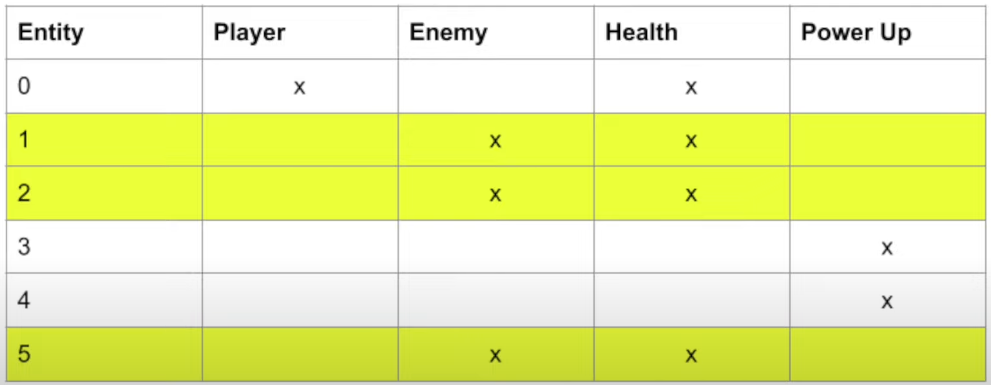
SQL Table vs. Entity Component Layout Table
Commands
Commands provides a safe, efficient and deferred way to modify your game’s state, facilitating tasks like spawning, despawning, and adding components to entities.
- Queue up actions to spawn/despawn entities and add/remove components on existing entities.
- Do not take effect right away, commands in the queue are automatically applied when it’s safe to mutate the World.
- Required exclusive access to the World and cannot be applied in parallel.
- Similar to performing
INSERTorDELETEoperations in a database.
Spawning Entities
commands.spawn((
    Position { x: 0.0, y: 0.0 },
    Velocity { x: 1.0, y: 1.0 }
));
Queries
Queries offer immediate access to existing components, enabling data retrieval and mutation within the ECS architecture.
- Directly access the components stored in Bevy’s ECS for reading or writing.
- Can be executed in parallel unless two systems both query the same component type and at least one access is mutable.
- Similar to performing
SELECTorUPDATEoperations in a database.
Querying Components
Bevy injects params automatically:
fn update_position(mut query: Query<(&Velocity, &mut Position)>) {
    // ...
}