IAM
AWS Identity and Access Management (IAM) 筆記。
Overview
- Identity and Access Management, Global Service
- 最小權限原則 (Least Privilege Principle)
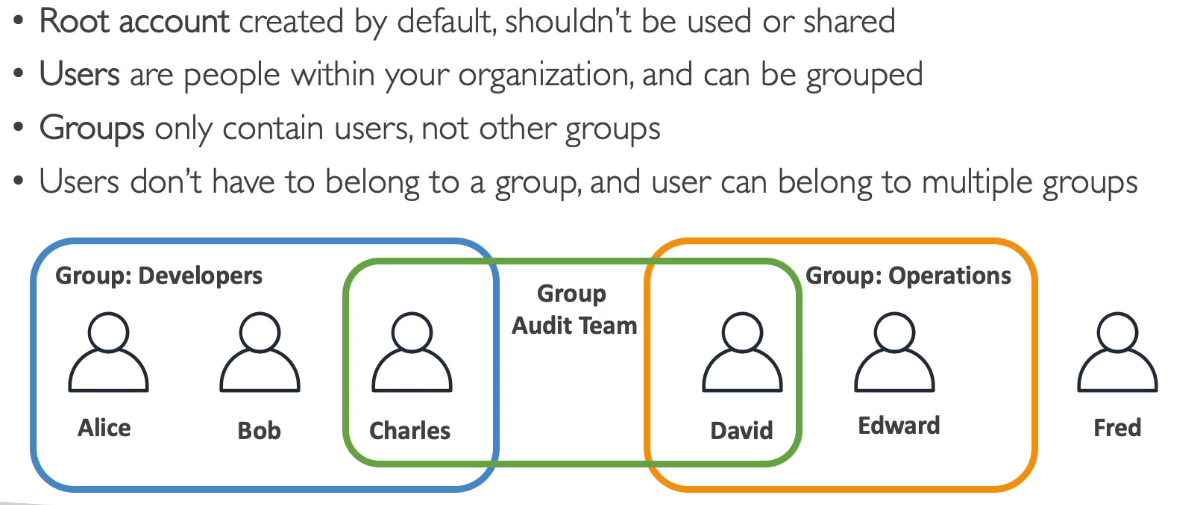
- Users or Groups can be assigned JSON documents called policies
Permissions
{
  "Version": "2012-10-17",
  "Statement": [
    {
      "Effect": "Allow",
      "Action": "ec2:Describe*",
      "Resource": "*"
    },
    {
      "Effect": "Allow",
      "Action": [
        "cloudwatch:ListMetrics",
        "cloudwatch:GetMetricStatistics",
        "cloudwatch:Describe*"
      ],
      "Resource": "*"
    }
  ]
}
Policies
Policies Structure
| Element | Description |
|---|---|
| Version | Policy language version |
| Id | Optional policy identifier |
| Sid | Statement ID (optional, must be unique) |
| Effect | Allow or Deny |
| Action | service:verb (e.g., s3:GetObject) |
| Resource | Amazon Resource Name (ARN) |
| Principal | User/Resource based policy target |
| Condition | Optional conditions |
ARN Format
arn:partition:service:region:account-id:resource-id/path
arn:aws:s3:::com.lex.demo.file/file1partition: Always “aws”region: Empty for global services (e.g., S3)account-id: Empty for some services (e.g., S3)
Conditions
{
  "Condition": {
    "StringEquals": {
      "aws:username": ["Bob", "Jenny"],
      "aws:principaltype": ["User", "FederatedUser"]
    },
    "DateGreaterThan": {
      "aws:CurrentTime": "2019-10-15T12:00:00Z"
    }
  }
}
Password Policy
- Set minimum password length
- Require specific character types (uppercase, lowercase, numbers, non-alphanumeric)
- Allow IAM users to change their own passwords
- Require password change after expiration
- Prevent password re-use
MFA (Multi-Factor Authentication)
Strongly recommended for all IAM users, especially root account.
Access Keys
Ways to access AWS:
- AWS Management Console: Protected by password + MFA
- AWS CLI: Protected by Access Keys (built on AWS SDK for Python)
- AWS SDK: Code-based, protected by Access Keys
Roles for Services
Roles allow AWS services to perform actions on your behalf.

Security Tools
| Tool | Level | Description |
|---|---|---|
| IAM Credentials Report | Account | Lists all users and credential status |
| IAM Access Advisor | User | Shows service permissions granted and last access time |
Best Practices
- Don’t use root account except for AWS account setup
- One physical user = One AWS user
- Assign users to groups and assign permissions to groups
- Use MFA
- Create and use Roles for AWS services
- Use Access Keys for Programmatic Access (CLI/SDK)
- Audit permissions with IAM Credentials Report
Shared Responsibility Model
AWS
- Infrastructure (Global network security)
- Configuration and vulnerability analysis
- Compliance validation
You
- Users, Groups, Roles, Policies management and monitoring
- Enable MFA on all accounts
- Rotate your keys often
- Use IAM tools to apply appropriate permissions
- Analyze access patterns & review permissions